
Take Profit Alerts for Active Traders: Setup and Automation
- Steven Hartwell

- Aug 17
- 16 min read

A take profit alert notifies you the instant a target price or condition triggers, so you can exit manually, feed the signal into a bot, or log the trade for review. If you want automated exits, the next move is simple: build the alert now, add a webhook, and connect it to your execution endpoint before your next open position.
Three platforms come up constantly in this workflow. TradingView handles chart-based alerts with message placeholders. TakeProfit runs cloud alerts with webhook and Telegram delivery baked in, and it documents 13 distinct alert criteria types, from simple crossing conditions to percent-based channel exits. And Big Move Algo sits on top of TradingView as a signal generator, producing Long, Short, and Exit labels you can wire directly into an alert.
TradingView supports dynamic placeholders like {{close}} and {{plot_0}} in alert messages.
TakeProfit’s alert engine covers price, percent, and range-based criteria with webhook and Telegram delivery.
Big Move Algo’s signals can populate an alert message automatically, cutting out manual price-watching entirely.
Quick stat: most retail platforms cap free-tier alert counts in the single digits to low dozens, which is why traders juggling multiple pairs almost always upgrade or route alerts through a dedicated service instead of relying on default limits.
Key Takeaways
Reliable take-profit execution depends on pairing a well-configured alert with a tested delivery path and a signal source that filters out noise before it reaches you.
Point | Details |
Alerts notify, they don’t execute | Build in a separate execution step, whether manual, broker-native, or bot-driven. |
Test before trusting real capital | Ping webhooks, preview message placeholders, and run a short-lived test alert first. |
Use frequency and cooldown settings | Prevent duplicate fires and notification fatigue with sensible frequency controls. |
Pair TP alerts with stop-loss orders | Never automate an exit path without a corresponding risk-management order in place. |
Big Move Algo supplies the signal layer | Its Fake Trend Detector and Long/Short/Exit labels feed directly into the alert and webhook workflow covered above. |
Table of Contents
What Are Take Profit Alerts and Why They Matter for Execution
A take profit alert is a conditional notification tied to a price level, indicator value, or drawn line on your chart. It fires when that condition is met, whether or not you’re staring at the screen. The alert itself doesn’t close a trade. It tells you, or a connected system, that the moment has arrived.
That distinction matters more than most beginners realize. An alert is a notification layer. Execution is a separate step, handled either by you clicking “close,” by a broker’s native TP order, or by a bot receiving a webhook. Confusing the two is the single most common reason traders think their “take profit” failed when really their alert fired and nobody acted on it.
The standard industry term here is conditional order alerting, though most traders just call it a take profit alert or TP notification. Both phrases describe the same mechanism: a rule, a trigger, and a delivery channel. Throughout this guide, the two terms are used interchangeably because that’s how traders actually talk about it on trading desks and in Discord servers.
Overview: Types of Take Profit Alerts and Where They Run
Five alert types cover almost every take-profit scenario you’ll build.
Price-level alerts trigger when the market touches or crosses a specific number. Indicator-series alerts fire off a calculated value, like an RSI reading or a moving average cross. Drawing and trendline alerts attach to lines you draw manually on the chart, useful for diagonal support and resistance. Percent-move alerts trigger on movement over a defined window, say a 3% swing in 15 minutes. Webhook-driven custom alerts skip the visual layer entirely and push structured data straight to an external endpoint.
Where these alerts actually run splits into four environments:
In-chart platforms like TradingView, where alerts live alongside your charting workspace.
Cloud alert services like TakeProfit, which run independently of any single charting tool and specialize in webhook and Telegram delivery.
Broker or terminal alerts, native to platforms like MetaTrader, often tied directly to order execution.
Execution and bot receivers, the endpoints that actually act on an incoming signal.
The tradeoffs are real and worth naming plainly. A chart-based alert is fast to set up but depends on your internet connection and the platform staying online. A broker-native TP order guarantees execution against the order book but sacrifices flexibility. Multi-condition alerts reduce false triggers but risk missing a valid exit if one condition never fires. And most platforms cap how many alerts you can run simultaneously, which becomes a real constraint once you’re tracking a dozen instruments.
If you’re deciding between manual exits, semi-automated monitoring, or full bot-driven execution, the choice usually comes down to how much you trust your own reaction time versus a coded rule. Manual exits work fine for someone watching two or three positions. Automation becomes necessary past that.
How to Create a Take Profit Alert Through the Alerts Dialog
Most platforms funnel alert creation through a dedicated dialog, sometimes called “New Alert,” “Create Alert,” or similar. The workflow is nearly identical across TradingView and TakeProfit, with minor field differences.
Open the alert dialog from your chart or the platform’s alert panel.
Select the source — the specific symbol, indicator, or drawing the alert should watch.
Choose the criteria — crossing, greater than, less than, entering/exiting a range, or a percent move.
Set the target value — your actual take-profit price or the threshold that defines it.
Configure frequency — once, once per bar, or every time the condition is true (this matters more than most people think).
Set an expiration date — open-ended alerts pile up and clutter your list if you forget this.
Write the alert message, including any placeholders you want passed to a webhook.
Choose delivery options — app notification, email, SMS, webhook URL, or Telegram bot.
Save and confirm the alert appears in your active alerts list.
A few fields deserve extra attention. The webhook URL field is where automation lives or dies. Type it wrong and nothing downstream will ever fire. The message placeholders determine whether your execution endpoint receives usable data or a blank template. And frequency/cooldown settings prevent duplicate fires. TakeProfit’s own documentation on setting up and managing alerts walks through frequency and expiration options in detail, and it’s worth reading once even if you think you know the interface.
Before trusting any alert with real capital, run through this test checklist:
Ping your webhook URL manually to confirm the endpoint responds.
Preview the alert message with placeholders filled to check formatting.
Set a short-lived test alert on a live, moving price to confirm delivery timing.
Check every delivery channel you selected actually received the notification.
Setting Take Profit Alerts Directly From the Chart
Sometimes the dialog is overkill. If you’re staring at a clean setup and want to mark a level fast, chart-based alerts are quicker.
Price-level alerts from the axis work by right-clicking a price on the vertical axis, or right-clicking anywhere on the chart, and selecting “Add Alert” at that level. This is the fastest path when you’ve already identified your exit price and don’t need custom criteria.
Attaching alerts to drawings goes further. Draw a horizontal line at resistance, right-click it, and set an alert tied to that exact line. Trendlines work the same way, which matters for traders who prefer diagonal levels over flat horizontal ones. A rising trendline off a series of higher lows makes a more honest take-profit reference than an arbitrary round number in a trending market.
Three practical examples show where this earns its keep. A visual TP at a resistance level works well for swing trades where you’ve marked a clear supply zone. A multi-trendline strategy lets you stack alerts along a channel, catching partial exits as price climbs through each line. A drawing-based percentage move combines a trendline with a percent-move criterion, useful when you’re trading breakouts and want confirmation past a specific distance from the line, not just a touch.
One caveat that trips people up constantly: on most platforms, deleting the drawing does not automatically cancel the alert tied to it. The alert persists independently once created, even if the visual line disappears. Always check your active alerts list after cleaning up a chart, or you’ll end up with phantom triggers referencing lines you can no longer see.
Alert Criteria You Can Use, With Real Examples
Every platform builds around a similar set of trigger conditions. Knowing which one fits your situation saves you from picking the wrong tool for the job.
Crossing — triggers the moment price crosses a fixed value in either direction.
Cross up / cross down — a directional version, useful when you only care about one side of the move.
Greater than / less than — a static threshold check, good for hard stop-and-target levels.
Entering or exiting a range — fires when price moves into, or out of, a defined channel.
Percent move in N bars — catches sudden momentum, like a 4% jump within 10 candles.
Indicator line crossings — triggers when one plotted line crosses another, such as a fast MA crossing a slow MA.
Here are templates worth adapting directly:
Price-based: “BTC/USD crosses above $68,500 — take profit target reached.”
Percent-based: “ETH/USD moves up 3.5% within 20 minutes — consider partial exit.”
Indicator-based: “RSI(14) crosses below 70 after being overbought — momentum fading, review position.”
Multi-condition example: “Price crosses above $122.00 AND RSI(14) is below 65.” Combining conditions like this cuts down on false triggers during choppy, low-conviction breakouts, but it comes with a cost. Every added condition increases the odds that a genuinely valid exit gets skipped because one secondary criterion never quite lines up. Use multi-condition alerts sparingly, and mainly when you’ve watched a specific false-signal pattern repeat enough times to justify the extra filter.
Whatever criteria you choose, set a sensible cooldown. A price oscillating right at your trigger level without a frequency limit will spam you with duplicate alerts every time it ticks across the line, which trains you to start ignoring notifications altogether.
Delivering Alerts: Webhooks, Bots, and Automated Execution
An alert that only pings your phone is fine for discretionary trading. An alert meant to trigger automated execution needs a delivery path built for machines, not eyeballs.
The common channels split into two categories. Human-facing delivery covers platform push notifications, email, mobile push, and messaging apps like Telegram bots or Discord webhooks where the integration exists. Machine-facing delivery means a webhook: a structured HTTP request sent to an execution endpoint or trading bot the instant the alert fires.
A basic webhook payload for a take profit alert typically looks something like this:
{
  "symbol": "{{ticker}}",
  "side": "close_long",
  "price": "{{close}}",
  "alert_id": "tp_btc_001",
  "timestamp": "{{time}}"
}
Your execution endpoint needs to parse a handful of fields reliably: the symbol, the side (are you closing a long or short), the price at trigger time, a unique alert_id for tracking, and a timestamp to sequence events correctly if multiple alerts fire close together.
Before wiring any of this into live capital, run through an integration checklist. Secure your webhook endpoint with authentication tokens rather than a bare public URL. Build in duplicate-suppression so a retry or a re-fired alert doesn’t double your position size. Design for idempotency, meaning the same alert_id received twice should never trigger two separate executions. Respect rate limits on both the sending platform and your receiving server. And confirm authentication headers are actually validated on the receiving end, not just logged and ignored.
When automating exits through a bot, the operating principle is simple but easy to overlook: whichever close action arrives first, the bot’s own built-in take profit or an externally sent custom close signal, is the one that closes the trade. 3Commas documents this exact behavior, and it means you need to design your alert and your bot’s native TP settings as a coordinated system, not two independent safety nets that might conflict.
Include entry price, take-profit price, and an order ID in your alert message placeholders whenever possible. Receivers that get raw price data with no context can’t reconcile which position an alert refers to once you’re running more than one strategy at a time.
Managing Large Numbers of Alerts Without Losing Track
Once you’re running more than a handful of alerts across multiple symbols, organization stops being optional.
Use a consistent naming convention across every alert you create.
Group related alerts by strategy or symbol using tags where the platform supports it.
Standardize your message template so every alert produces parseable output.
Set expiration dates on anything that isn’t meant to run indefinitely.
Apply cooldowns uniformly so you’re not tuning noise reduction one alert at a time.
Pro Tip: Build your alert names around a fixed pattern like strategy|symbol|tp|size|mode, for example breakout|EURUSD|tp1|0.5|auto. This single habit makes batch editing, filtering your alert history, and debugging a misfire dramatically faster once you’re running 20+ live alerts at once.
For day-to-day operations, know the difference between pausing an alert (it stays configured but won’t fire), deleting it (gone entirely), and cloning it (duplicating the same logic across a new symbol without rebuilding from scratch). Cloning saves real time when you’re applying the same TP structure across a basket of correlated pairs.
When something doesn’t fire as expected, check three things in order. First, the alert history log, most platforms record every trigger even if you missed the notification. Second, webhook delivery failures, which usually show up as a non-200 response code in your endpoint’s logs. Third, rate-limit throttling, since a platform sending too many alerts too fast may silently drop or delay some of them.
On the noise side, MT5’s alert guide is worth studying even if you don’t trade on MetaTrader, because its defaults reflect sound practice generally: TP hit alerts are typically off by default to cut down on notification fatigue, while entry price alerts stay on since missing an entry is costlier than missing a redundant TP ping. Applying similar logic to your own alert set, muting the low-value pings and keeping the high-stakes ones loud, keeps your attention where it belongs.
Using Indicators and Dynamic Variables in Alert Messages
Here’s a rule that catches almost every new TradingView user off guard: an indicator has to actually be added to your chart before its output shows up as a selectable source in the alert dialog. If you built a custom Pine Script that calculates a take-profit level but never applied it visually, the alert dialog won’t see it.
A basic Pine v5 pattern for a dynamic TP message looks roughly like this:
//@version=5
indicator("TP Alert Example", overlay=true)

entryPrice = close
tpPrice = entryPrice * 1.03
slPrice = entryPrice * 0.98

msg = "Entry: " + str.tostring(entryPrice) + " TP: " + str.tostring(tpPrice) + " SL: " + str.tostring(slPrice)

if (barstate.isconfirmed)
    alert(msg, alert.freq_once_per_bar)
This creates entry, take-profit, and stop-loss variables, formats them into a single readable string, and pushes that string using alert() rather than alertcondition().
A widely referenced Stack Overflow thread on TradingView alert patterns makes the key limitation explicit: alertcondition() doesn’t support embedding dynamic TP and SL variables into a single message. The practical workaround is to use alert() with a formatted string, or lean on plot-based placeholders like {{plot_0}} when you need the value pulled from a chart series rather than calculated inline.
A few platform limitations are worth knowing before you build anything complex. TradingView caps the total number of active alerts per account tier, so a script that fires constantly can quietly eat your quota. Setting frequency to “once per bar close” instead of “every tick” is usually the fix. And always preview your message payload before going live. Send a test webhook to a service like a temporary request-inspector URL, confirm the placeholder values actually populated with real numbers rather than showing up blank, and only then point it at a live execution endpoint.
How Big Move Algo Handles Take Profit Alerts
Big Move Algo runs as a TradingView indicator, which means the setup path follows the same alert mechanics covered above, just pointed at a signal source built specifically to flag exits.
Getting it running takes a short sequence: install the indicator on your TradingView chart, choose between AUTO Mode for a fast, minimal-configuration start or Manual Mode if you want to tune sensitivity yourself, enable alert placeholders so the Long, Short, and Exit labels populate your alert messages automatically, and configure your delivery channel, whether that’s a webhook to an execution endpoint or a Telegram bot for mobile notifications.
A few specifics make it worth mapping into your workflow directly:
Fake Trend Detector filters out choppy, low-quality conditions before they ever generate a signal, cutting down on the false-trigger problem that plagues raw price or indicator alerts.
Multi-market coverage across crypto, forex, stocks, indices, and commodities means one indicator handles alert logic across your entire watchlist instead of building separate rules per asset class.
Long, Short, and Exit labels map cleanly onto alert message placeholders, so your webhook payload can carry a structured signal type instead of raw price data alone.
Unlimited devices means the same alert configuration follows you across desktop and mobile without re-setup.
A sample alert message from Big Move Algo, structured for webhook parsing, might read: "Signal: {{strategy.order.action}} | Symbol: {{ticker}} | Price: {{close}} | Time: {{time}}". That structure routes cleanly to an execution endpoint or into Big Move Guard for automated handling once the signal fires.
Best Practices for Setting Take Profit Levels
The most common mistake in take-profit placement is anchoring to a round number instead of market structure. $50,000 on Bitcoin feels significant because it’s round, not because price behaves differently there. A target based on average true range, a prior swing high, or a measured move from a chart pattern reflects how the instrument actually trades. Round numbers only earn a spot in your plan when they line up with real confluence, like a round number that also happens to sit at a prior high.
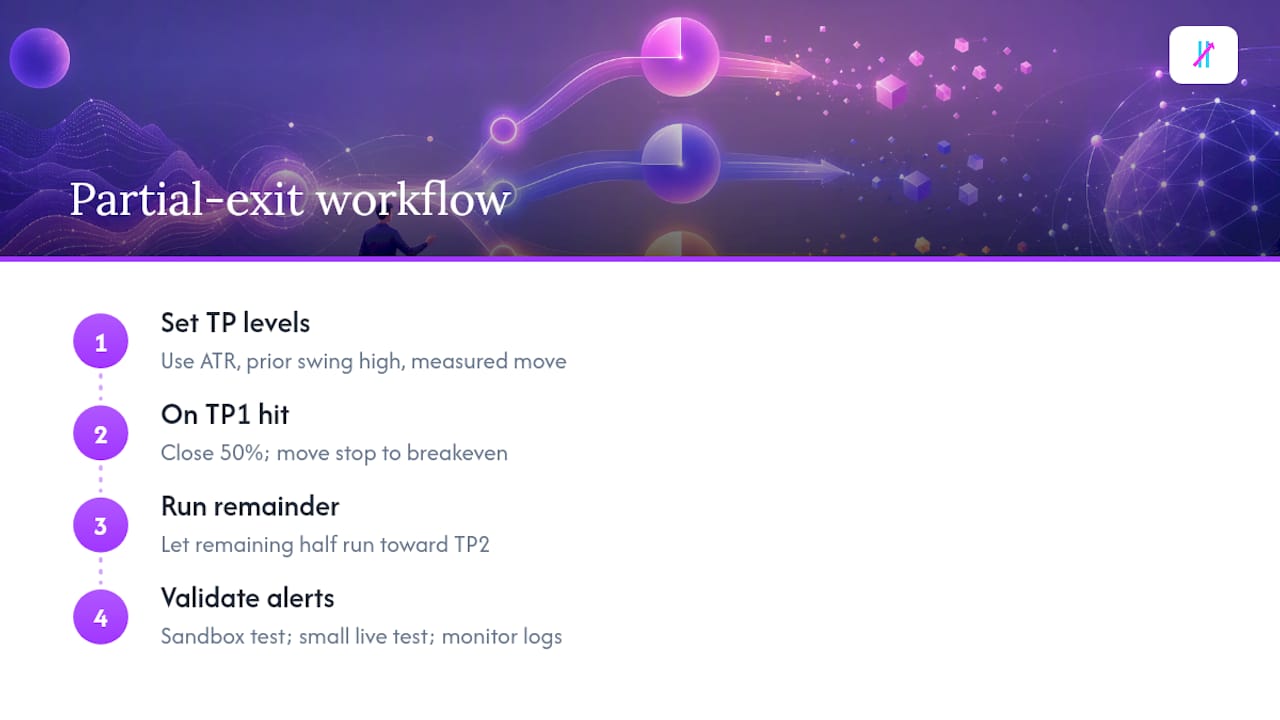
Partial-exit strategies spread risk across multiple TP levels instead of betting everything on one target. A common structure: close 50% of the position at TP1, move the stop-loss to breakeven, then let the remaining half run toward TP2. Documented TP hit workflows show exactly this pattern in practice, where hitting TP1 triggers a partial close and simultaneously shifts the stop on the remaining lot to lock in gains. It’s a structure worth copying regardless of which platform you trade on.
Before trusting any of this with meaningful size, run a validation sequence. Sandbox test your alert and webhook chain with paper trading or a demo account first. Run a small live test with minimal size once the sandbox passes, watching every step from trigger to fill. Monitor your logs for a few sessions before scaling up, checking specifically for delayed fires, dropped webhooks, or malformed payloads.
And be honest about the tradeoffs of alerts versus broker-native TP orders. An alert depends on your connection, the platform’s uptime, and your webhook receiver all working simultaneously. A broker’s native TP order sits on the exchange’s order book and executes independent of your internet connection, at the cost of losing the flexibility to add conditions or reroute the signal elsewhere. Slippage and latency affect both, but a native TP order removes at least one point of failure from the chain. Many experienced traders run both: a broker TP order as the guaranteed backstop, and a custom alert as the flexible, condition-aware layer on top.
When Alerts Beat Broker Orders, and When They Don’t
The honest answer is that neither approach wins outright. Speed and flexibility pull one direction, execution guarantees pull the other, and picking wrong in either direction costs you.
A broker-native take-profit order sits directly on the exchange’s book. Nothing needs to load, nothing needs to receive a webhook, nothing needs your Wi-Fi to stay up. That reliability is worth real money when you’re trading size you can’t afford to leave exposed. A custom alert, by contrast, gives you conditions no broker order type supports, like a multi-indicator confirmation or a percent-move trigger, but every extra step between trigger and execution is another place things can go wrong.
In practice, the decision usually comes down to three questions. How much can you actively monitor at once? If you’re watching two charts, a visual alert plus manual execution works fine. Past five or six positions, you need automation or you’ll miss fills. How reliable is your automation chain, tested end to end, not just assumed to work? And how much does guaranteed fill priority matter for this specific trade? A scalp on a fast-moving small-cap crypto pair behaves very differently than a swing position on a major forex pair with deep liquidity.
For discretionary scaling out of a position across multiple targets, alerts paired with manual execution give you the judgment call a rigid broker order can’t replicate. For a fully automated strategy running unattended overnight, a broker-native TP order as the backstop, with an alert-driven system layered for anything more nuanced, tends to hold up better than relying on one or the other alone.
Get Reliable Take Profit Signals Without Building It Yourself
Everything covered above, the alert dialogs, the webhook JSON, the Pine Script variables, works. But building a clean signal source from scratch, one that actually filters out choppy false breakouts before they ever reach your alert, is a separate project most traders never finish. Big Move Algo gives you that signal layer already built, running on TradingView, ready to feed straight into the alert workflow you just learned.
The Fake Trend Detector does the filtering work that most manual alert setups skip entirely, flagging low-quality conditions before a Long, Short, or Exit label ever fires. AUTO Mode gets you running in minutes with no configuration, while Manual Mode hands you full control once you know what you want tuned. It works across crypto, forex, stocks, indices, and commodities, and every signal is structured to drop cleanly into a webhook message for Telegram delivery or direct routing into an execution endpoint. For traders who want the automated layer without wiring their own bot logic, Big Move Guard handles that connection directly.
If you’re ready to stop manually watching charts for your next exit, check out Big Move Guard and get your signal-to-execution path running today.
Frequently Asked Questions
What’s the difference between a take-profit alert and a take-profit order? An alert notifies you when a condition is met. A take-profit order actually closes the position, either through your broker’s native execution or through a bot receiving the alert as a trigger. Confusing the two is the single most common alert mistake.
Can I set multiple take-profit alerts on the same position? Yes, and it’s standard practice for partial-exit strategies. Set separate alerts for TP1, TP2, and TP3, each tied to a different price or percent target, and pair the message with an order ID so you can track which leg fired.
Why didn’t my take-profit alert trigger even though price hit the level? Check three things: your alert frequency setting (a “once” alert that already fired won’t retrigger), whether the alert expired before price reached the level, and whether your webhook endpoint actually received and processed the payload rather than silently failing.
Do webhook-based alerts work with trading bots automatically? Only if the bot’s endpoint is built to parse your specific payload format. Confirm your JSON structure matches what the bot expects, symbol, side, price, and a unique alert ID at minimum, before connecting live capital.
Is Big Move Algo compatible with TradingView’s native alert system? Yes. Big Move Algo runs as a TradingView indicator, so its Long, Short, and Exit signals populate the same alert dialog and message placeholder system covered throughout this guide.
This article is general information, not a substitute for advice from a qualified financial advisor. Consult a qualified financial professional about your own circumstances before acting on anything here.
Sources
Recommended
Comments